How to Compare a PDF Proof With the Revised Version and Measure What Changed
A revised PDF often looks identical to the last one, until it is printed and a margin has moved by 3 mm. To compare a proof with its revision you need numbers, not just eyes. Split view in PdfRuler shows the two versions next to each other, each with its own accurate rulers, so you can read the same element in both and see exactly what changed. It all runs in your browser and nothing is uploaded.
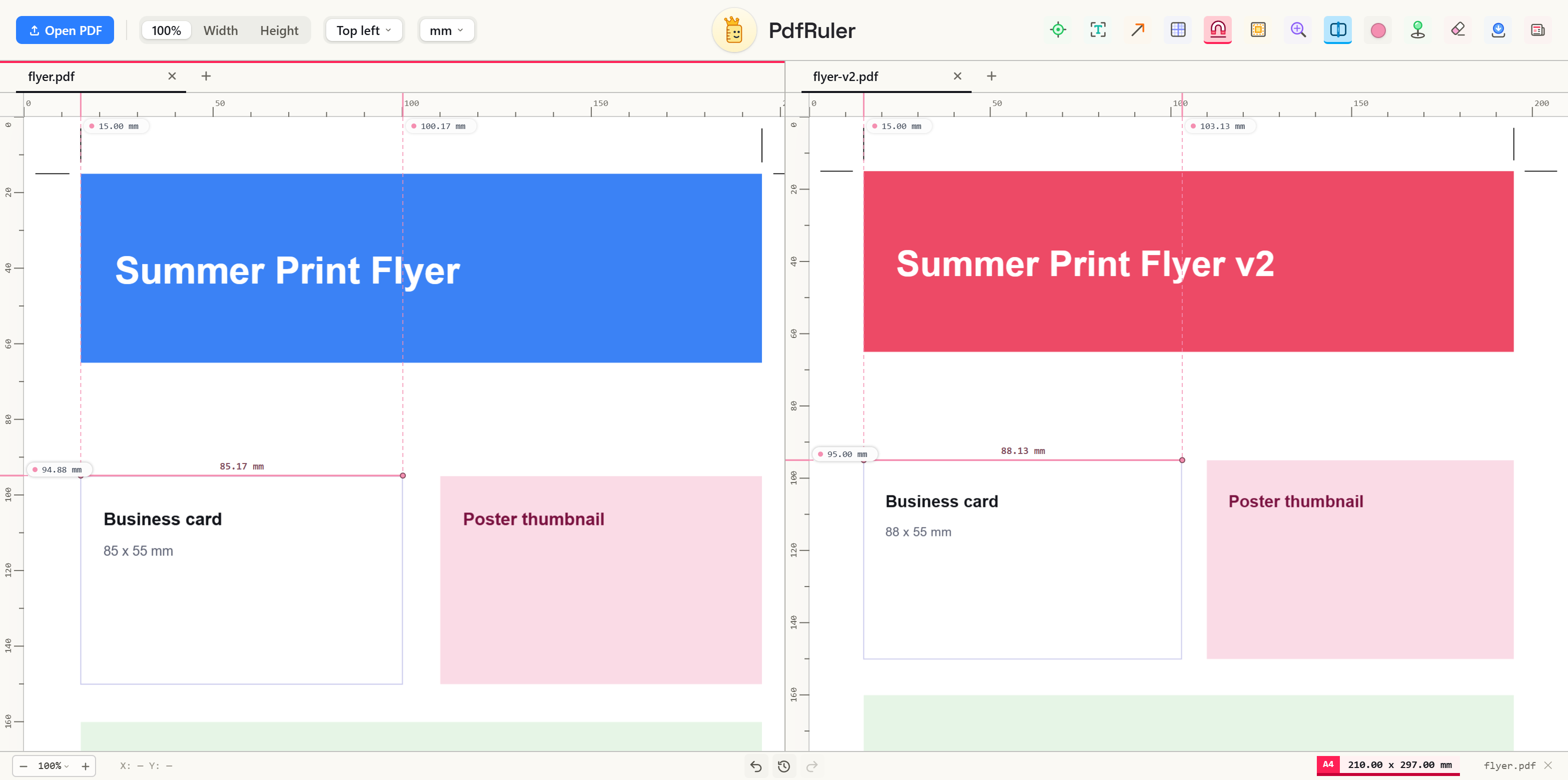
Compare the two versions step by step
- Open the proof at pdfruler.com/app, then press V to split the window.
- With the right pane focused, press O and open the revision. Click the left pane to work in the proof, and the right to work in the revision.
- Make sure both panes use the same unit and origin, so the numbers are comparable.
- Measure the same element in each: use Pick for one box, or Auto-measure for every box on the page, then compare the labels.
- Pull a guide to the same distance in both panes. If an edge sits on the guide in one and not in the other, something moved.
What to look for
- Sheet size. The status bar badge shows the page size of the focused pane. A proof at A4 and a revision at 215.9 x 279.4 mm (Letter) will not print the same.
- Margins and bleed. Turn on page boxes in each pane to compare the media, bleed and trim boxes the files declare.
- Resized or shifted boxes. A logo, card or photo that changed by a few millimetres shows up as two different numbers.
Good to know
The panes are fully independent: scrolling or zooming one does not move the other, so you can look at a detail in the proof at 400% while the revision stays at fit-to-width. When you are done, press V again and both PDFs come back as tabs. If a file has more pages, use the page switcher in each pane to line up the same page.
Frequently asked questions
How do I compare two versions of a PDF?
Open both in PdfRuler with split view (press V), measure the same element in each pane with Pick or Auto-measure, and compare the numbers. Differences in size or position show up straight away.
Can I see two PDFs side by side for free?
Yes. PdfRuler is free and runs in your browser. Split view shows two PDFs next to each other, each with its own rulers, and nothing is uploaded.
Will scrolling one PDF scroll the other?
No. Each pane is independent, with its own page, zoom and measurements, so you can inspect a detail in one without moving the other.

Free, private, in your browser. No upload. Or check the paper size reference.